
AUM data can be updated either for a single program or for multiple programs at once.
If you would like to update the company total AUM, see Company AUM instead.
1. Single program
Use this option when you want to update AUM data for one specific program.
Workflow
1.1 Navigate to the AUM section
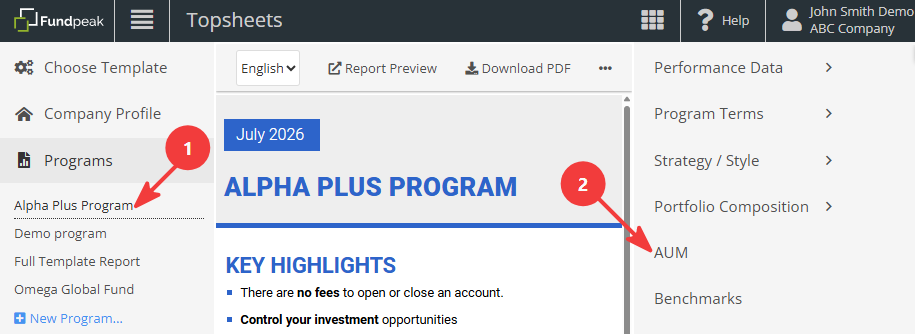
Select the program in the left-hand panel. Then open AUM in the right-hand panel.
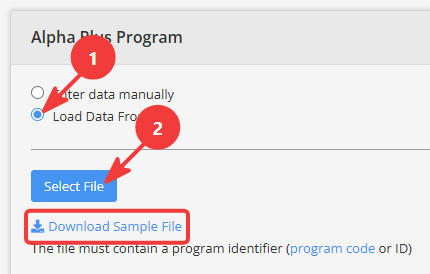
1.2 Prepare and upload an Excel file
Note: If you prefer to enter the data manually, skip to step 1.3 Manual input.
The file must contain a valid program identifier and retain the required structure and formatting. We recommend starting by downloading the sample file available on the AUM page.
See Creating Import file / Mass import file for more information.
After uploading your file, click Save to start the import process.

1.3 Manual input
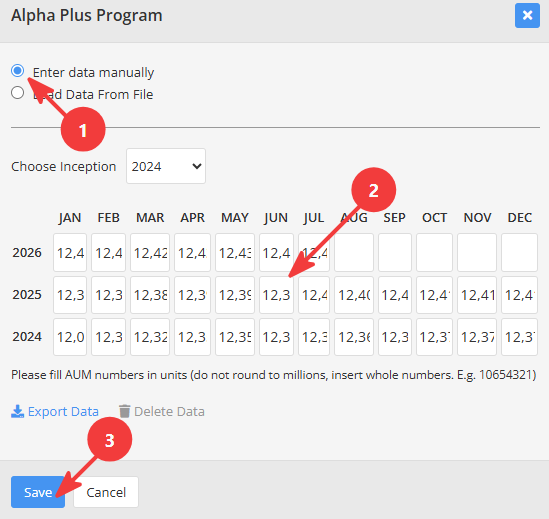
AUM data can also be entered manually in the AUM section. Enter or update the required values and click Save.
2. Multiple programs
Use Mass AUM Import when you want to update AUM data for multiple programs at once. The workflow is the same as for other mass imports. See Import performance data for multiple programs for instructions on preparing the file, validating the data, and running the import.
Related topics
Company AUM
Creating Import file / Mass import file
Import performance data for multiple programs