
The calculation method can be set separately for each program or portfolio. The calculation type affects all relevant statistics and charts on the report.
1) Program
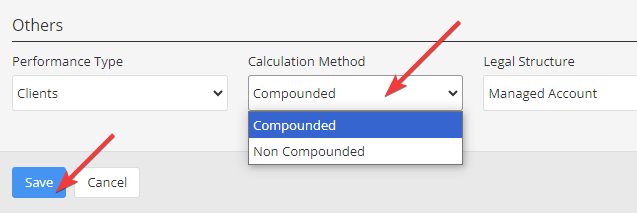
Compounded or non-compounded calculation methods are available for programs.
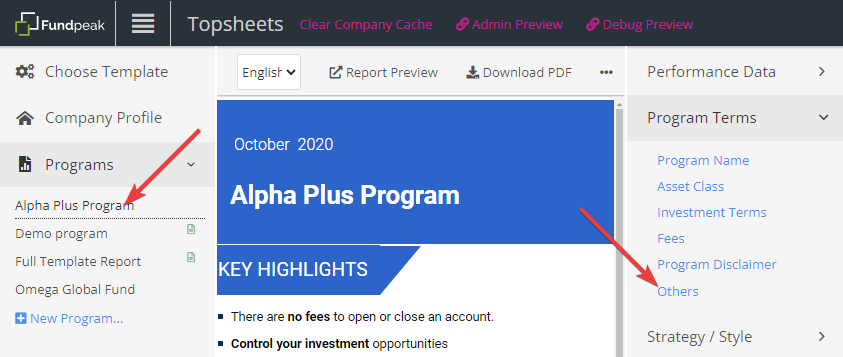
– Select a program in the left frame
– Go to Program Terms / Others.
– Choose the desired calculation method and click Save.
2) Portfolio
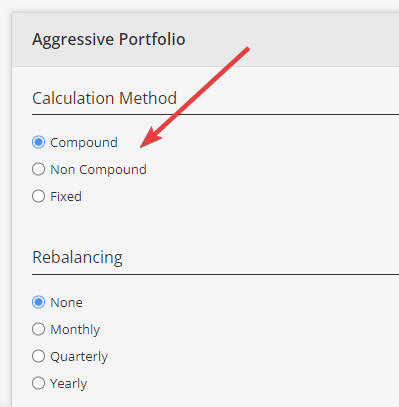
Compounded, non-compounded or fixed calculation methods are available for portfolios. Please see Calculation Methods in Portfolio for more information about individual calculation types.
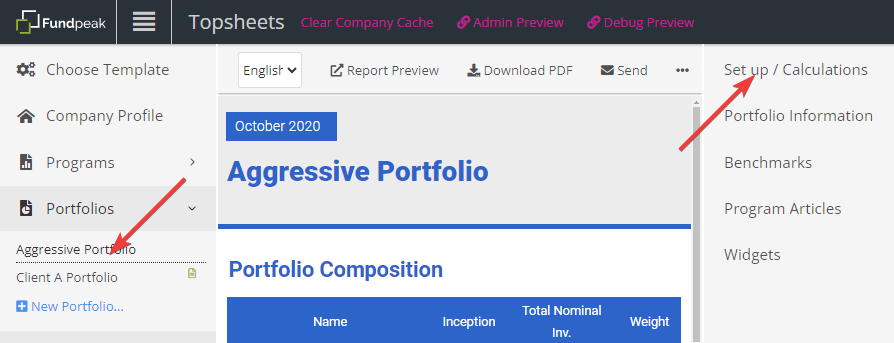
– Select a portfolio in the left frame.
– Go to Set up / Calculations.
– Choose the desired calculation method, scroll down and click Save.
See also:
What’s the difference between compounded and non compounded rate of return?
Calculation Methods in a Portfolio